Setting up IPv6 in Mikrotik routeros (7.x.x) for use on Aquiss
Introduction
This guide has been written around routeros 7.23.2 but should be applicable to earlier versions and has certainly been validated back to 7.19.0. It was written using a Mikrotik RB5009UG+s+ configured via Winbox 4.2.
There is a presumption that the reader understands the differences between IPv4 and IPv6, notably the fundamentals of how IPv6 works and the ‘direct connection’ model. In this guide, we will not cover IPv6 NAT. We will also assign static /64 prefixes to each of our VLANs (or single LAN), rather than issuing it from the pool.
Note: Whenever changing configuration (certainly for the first time) through Winbox, it is always advisable to enter ‘safe mode’ first. That way, if admin access is lost the changes are reverted automatically.
There are 3 fundamentals that we need to address:
- Obtain a static /56 prefix allocation from Aquiss
- Create an interface for every VLAN, or LAN (it can just be one or many – just repeat the process)
- Advertise via RA to our clients to allow them to get global routable IPv6 addresses via SLAAC.
Let’s begin:
- This is the area of Winbox we’re going to be interested in. The IPv6 sub menu.
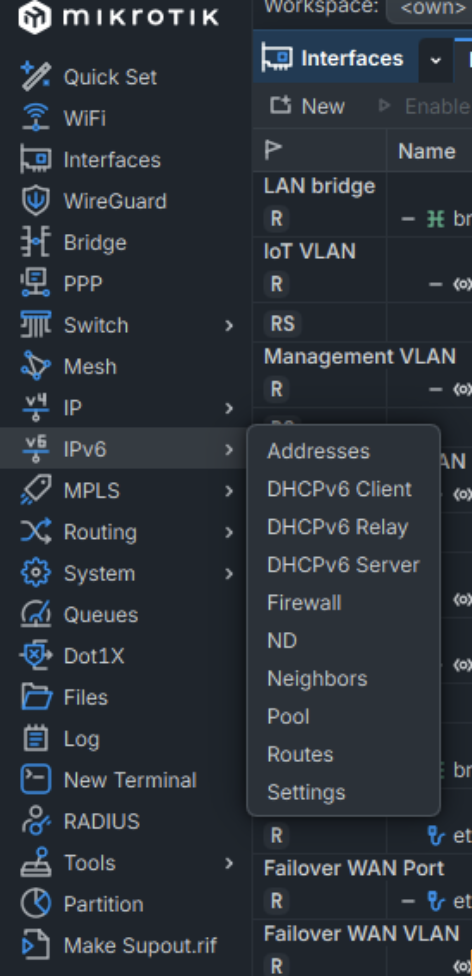
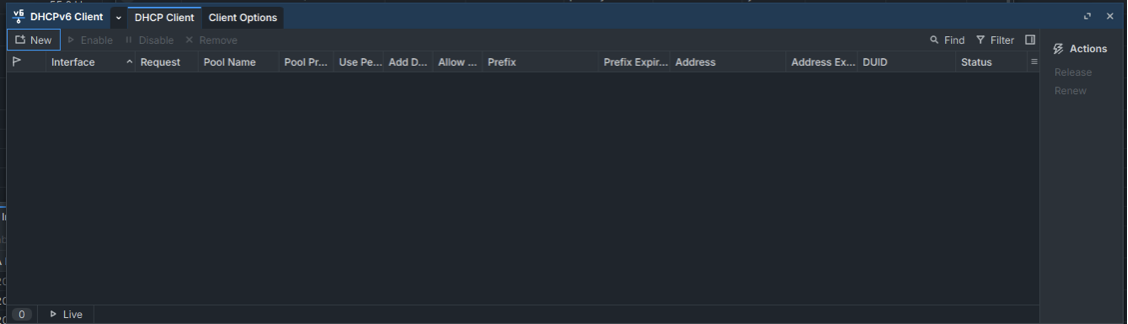
- Navigate to IPv6 > DHCPv6 Client, and click on new.
- Now, enter the following. Note: Your comment can be anything you like, as can your pool name.
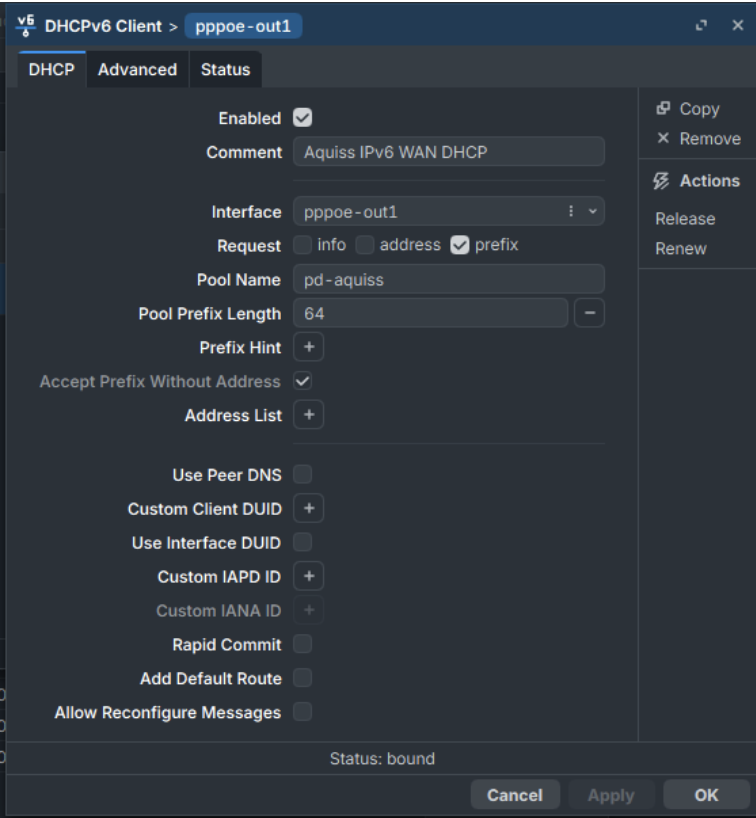
The key parts are:
Interface – your WAN interface (with Aquiss, very likely to be pppoe-out1, unless you renamed it)
Pool prefix length – should be 64. This is the size of the chunks handed out from the delegated block to each downstream interface, not the delegation size itself. 64 is correct/standard per subnet.
Request – prefix only. WAN pppoe-out1 interface doesn't need its own global address; it routes using the peer's link-local as next-hop. You only need the delegated prefix to hand out to your VLAN(s). - Click apply or OK and the status should change to bound. If it doesn’t, check that you have an IPv6 firewall rule to allow DHCP communications. This will be on your input chain, placed near the top, ideally just below the drop invalid entry. The source address is link local, but that is normal for how IPv6 works in this case.
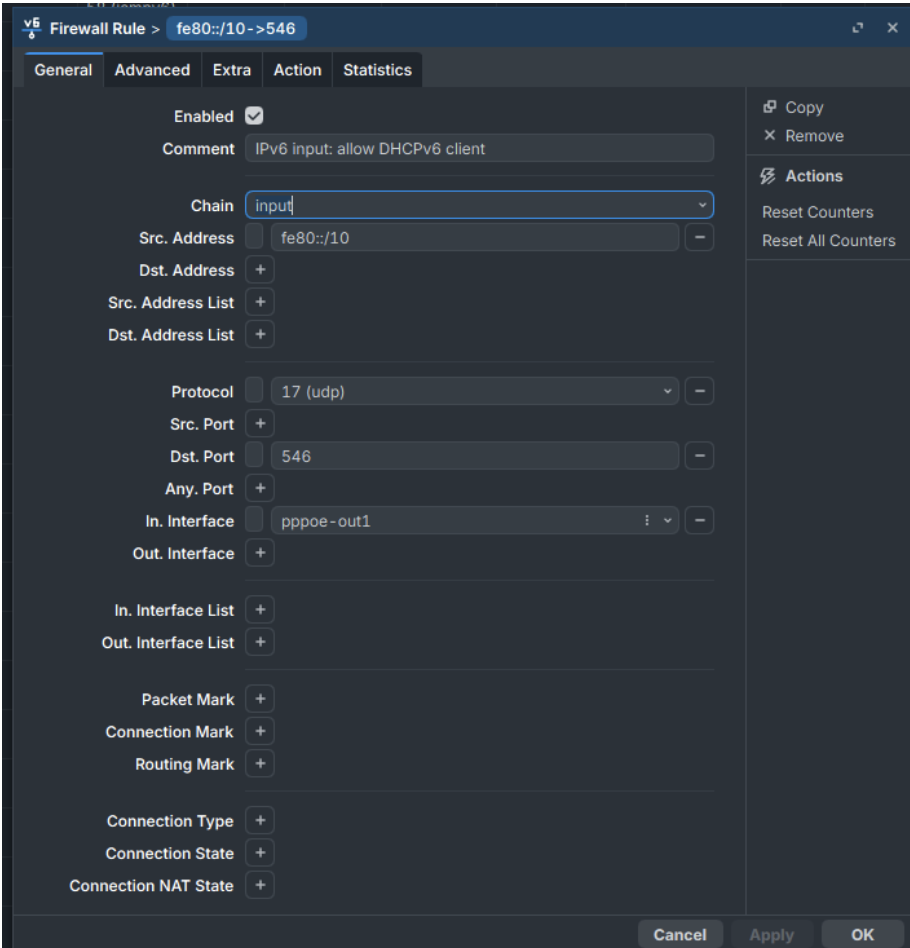
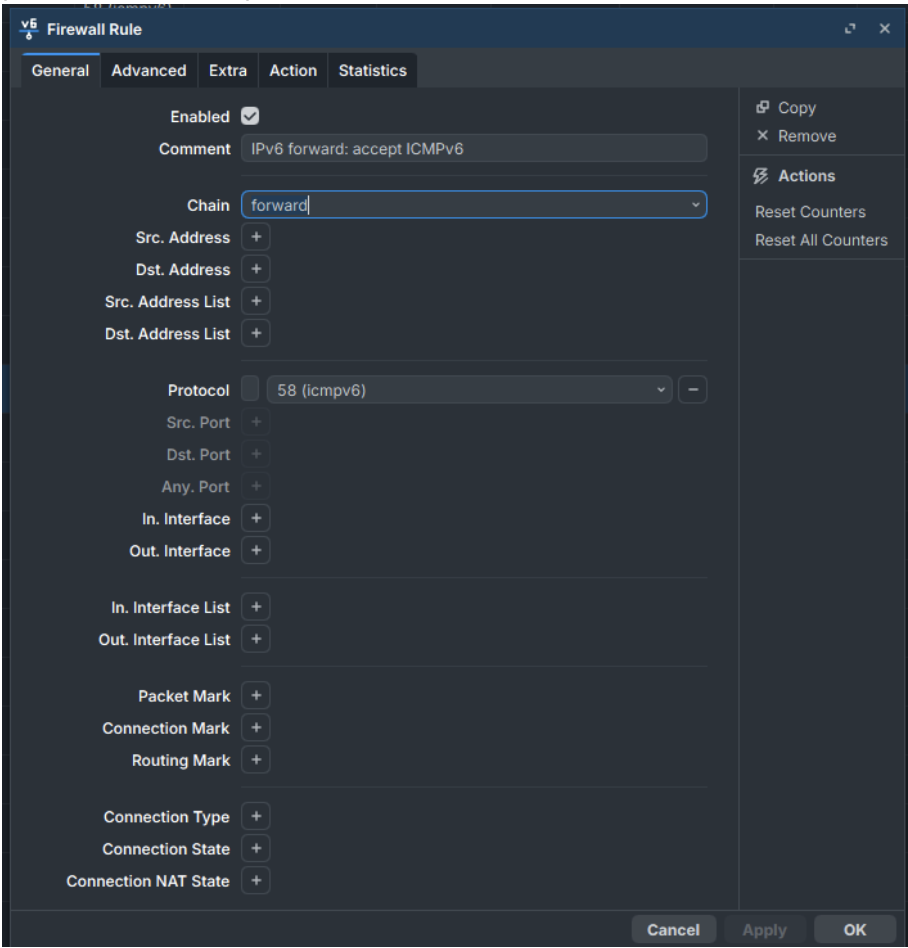
- While we consider firewall rules, IPv6 needs ICMP to function correctly, unlike IPv4 so you must allow it in your forward chain:
- Under IPv6 > DHCPv6 client > status, if everything is well you should see your WAN global prefix – i.e. 2a07:xxx:xx:1000::/56 – make a note of this.
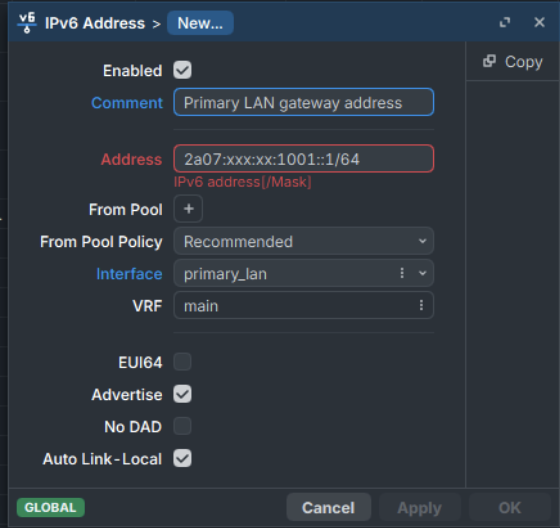
- Next, go to IPv6 > addresses > new. The address should be your WAN global prefix, incremented with a host of 1 at the end, such as in the example. I.e. if your WAN prefix is 2a07:xxx:xx:1000::/56 – then here we want to enter an address of 2a07:xxx:xx:1001::1/64. This will essentially become the gateway address for that interface.
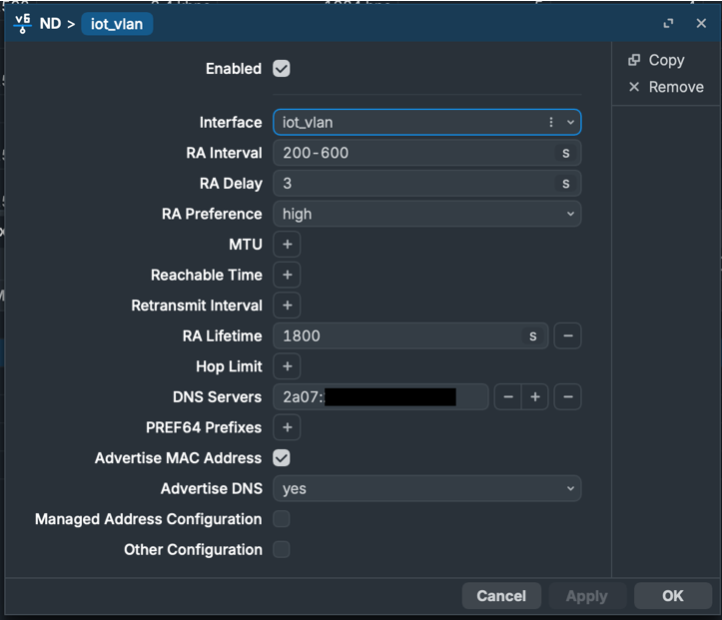
- Now, we want to go to IPV6 > ND (Neighbour Discovery). Routeros will have an entry for all, however, I suggest adding a new entry and disabling the all option, as you can segregate your VLANs and have much finer control if you want to go down that path later. You want to ensure that Advertise DNS is set to ‘yes’ and the DNS server has an entry. In this case, my router is acting as a DNS server and listening on all internal interfaces, so I point to that. Here you can see the entry for my IoT VLAN.
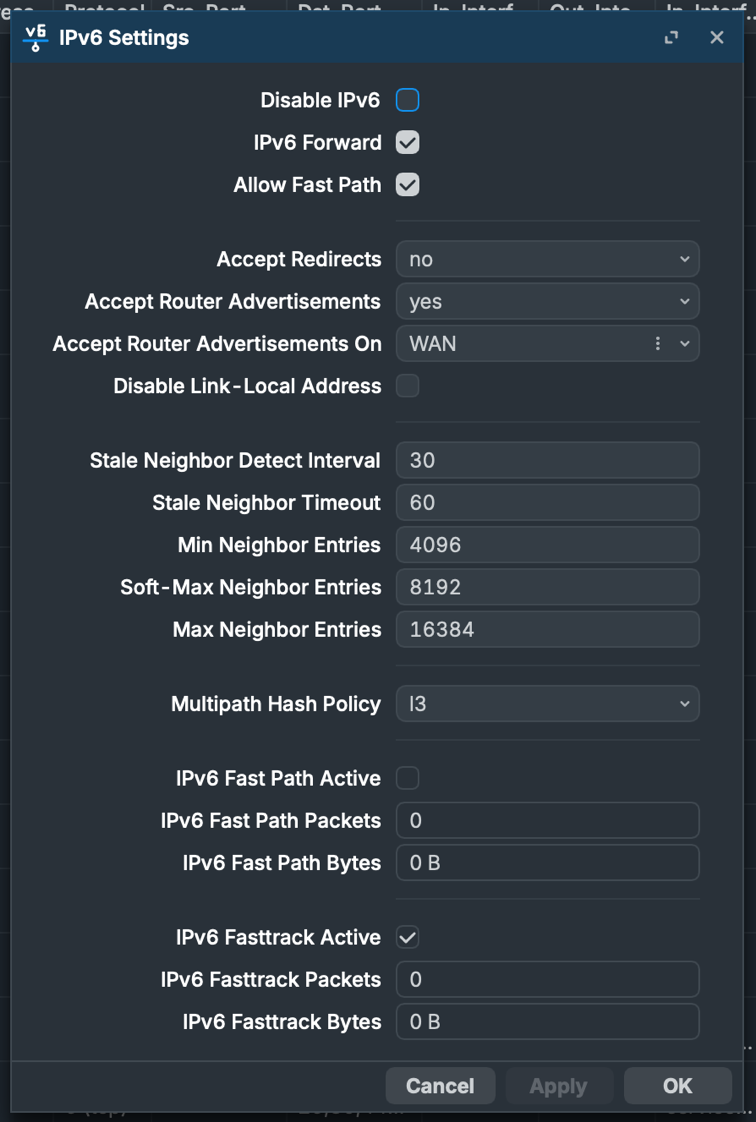
- Finally, goto IPv6 > settings, and ensure they match as per below, particularly ensuring that ‘Disable IPv6’ is NOT checked, accept Route Advertisements is ‘yes’ and you want to accept router advertisements on your WAN interface (or interface group, as below).
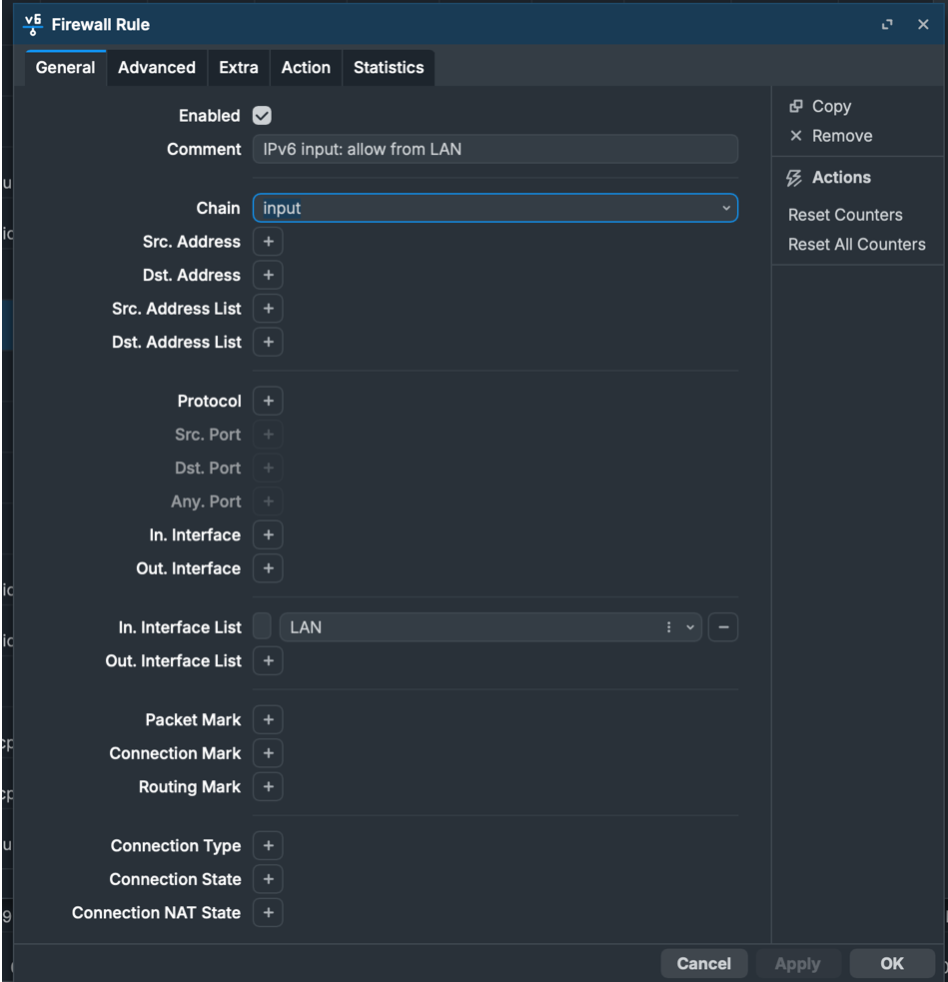
- All being well, your clients should now be able to get IPv6 addresses. It is normal for some devices (i.e. Apple clients) to get two global IPv6 addresses, which is done as a security measure. You can go to ip6.biz, which will show you your current IPv6 address, DNS and ICMPv6 reachability. If you are struggling to get an address, ensure that any LAN has input chain access on the IPv6 firewall.
- Finally, ensure that your LAN(s) are secure and that your IPv6 clients are protected. This guide will not cover that, but I encourage you strongly to go and research how to ensure that is the case.
0 comment(s)
No comments yet. Be the first to comment.
Leave a comment